
The Complete Guide To Font Pairings For Blog
Hello! Today I’m going to share an important topic that maybe you’ve heard many times but actually never pay attention to it. Yes, It’s font pairings.
Maybe some of you know what font pairings are or perhaps you never heard about it. To help you understand it, I decided to make this Complete Guide to Font Pairings For Lifestyle Blog.
So you can make a beautiful website or blog that you’ve dreamed of.
This page may contain affiliate links. Read my disclosure HERE.
The Importance of Branding
This post is a part of the Blog Branding series that I make to help you understand what is blog branding and how to do it in the right way. Now, I will give you a little brief on why blog branding is important.
Since your blog is a representation of your business, it’s necessary to pay attention to your blog branding.
Branding is the vital communication technique that lets you connect with your customers, fans, and followers instantaneously. It also helps the readers to acknowledge you as soon as they see your blog/website.
This also applies to your pins. If you already decide what type of branding you want for your blog, then your pins’ banding will be the same as your blog.
I’m not going into deep about branding because I’ll be doing a separate post on that. The point is blog branding plays a big part in your blog.
In this post, I’ll be covering a lot of aspects you need to consider and do in order to have good blog branding.
Last time, I make the first post on my Blog Branding Series which are:
- 14 Best Places to Find Feminine Styled Stock Photos For Lifestyle Blog
- 10 Feminine and Minimalist Themes for Lifestyle Blog
- How to Create a Professional Logo with PicMonkey
What are Font Pairings?
If you see your blog right now, a font is a part of your blog. You use a certain font in your post.
Font pairings in your blog are the font combinations of your headline post and body text. This also applies to your pins. Well, some people may use one font but some may use more. It all depends on your preference.
As important as your pins are, you need to pay attention to your blog also.
For example: Is your post easy to read? Well, for me personally, I prefer a clean and simple font on my blog so my readers don’t have difficulties reading my blog.
One thing that I’ve always notice in every lifestyle blog is the font’s size on their blog is small and tiny. Maybe they like it small and tiny.
But what you need to consider is the possibility of your readers using their phones or 14-inch laptop which could be hard for them to see if your font size is small.
Another thing to consider is the color of the fonts. The bold color would be easier to see rather than a bright color. Black will be easier to see rather than a light grey.
Some people may love it but some people might stop reading and leave your blog right away because their eyes are too tired to read.
This applies to links too. Having 2 colors for your blog is more than enough. You can have a darker or different color for the links or you can add an underline to help the reader notice that it’s a link.
Just remember this, when you’re customizing your blog. Try to see the mobile version of it and you’ll be able to grasp if your readers are comfortable with what you choose or not.
Always consider your readers’ position.
What is the Perfect Font Type for Lifestyle Blog?
None. nada.
There is no such thing as a perfect font.
But, you can say that you have a perfect font when the font fits perfectly with the blog’s theme and niche. Now, I’m not going to talk about other niches instead I only talk about one niche which is the lifestyle blog.
If you look around for lifestyle blogs on Pinterest, you will notice one pattern. Lifestyle blogs have a minimalist, clean and simple look.
As you all know, my blog also is a minimalist type. Well, not super minimalist but this is the type of blog that I want. The font is simple and easy, the theme is clean and organized. It looks professional.
Another thing you’ll notice in lifestyle blogs is the font combinations. They use simple and clean look fonts because they want the picture to appeal more than the fonts.
Before going into deep, let me tell you what I recommended as good fonts for a lifestyle blog.

Free download:
Open Sans // Trocchi // Annisa // Mission Script
These 4 are the most popular fonts to use for lifestyle blogs out there. To help you understand better about these fonts. You may see there is an obvious difference between calligraphy and handwritten font.
What many people usually missed is the difference between sans-serif and serif fonts? Here’s a picture to understand it better.
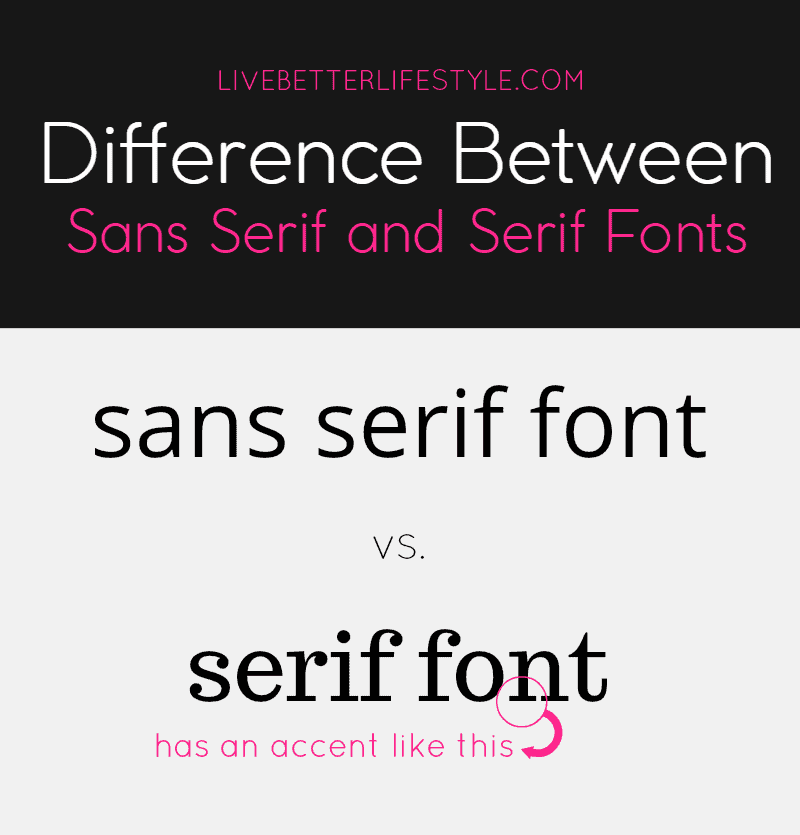
Now, what I suggest if you want to have a minimalist blog. You need to use sans-serif fonts because it looks clean and simple rather than serif fonts.
Probably you’re wondering now, there are a lot of sans-serif fonts out there but which one to choose? Do not worry!
Because now I’m going to share with you some of my favorite sans-serif fonts that would be a great fit for your lifestyle blog.
Font Pairings for Your Blog and Pins
There are two things you need to consider doing font pairings. One is for your BLOG.
Now, you are looking at fonts. But which font is actually perfect for your blog? If you are confused you can check the fonts down below.
These are my favorite FREE fonts which of course you can download too via the link down below.

Free download links:
Quicksand – Roboto // Francois One – Arimo // Poppins – Nunito
Oswald – Work Sans // Montserrat – Tahoma
Please note that all of these are Google fonts, so you may want to check if your theme supports these fonts or not. Some themes may already have those fonts but some may not have.
The next thing you need to consider doing font pairings is your PINS.
As you may know, popular bloggers always tell you to make 3 to 5 pins for each post. Let’s say in order to make that many pins, you need to have a plan. Three to five designs that are fit for your blog.
Let me give you some tips:
Tip #1 You can look for pin’s designs from popular bloggers on Pinterest that’s fit your brand. By doing this, you will have an idea of how to design your pins.
Tip #2 Use bold colors but not bright. Too bright fonts may cause your readers to turn away from your pins.
Tip #3 Find the perfect combination of fonts and background images that fit your brand.
Tip #4 This is from my own experience. For a lifestyle blog like mine, my most popular pins are the ones with less crowded images with sans-serif fonts. That are the most pins that people click on.
For color, the combination of black, grey, and feminine colors like peach and pink is what I use on my pins.
Hopefully, after you followed the above tips. You will be able to figure out what’s best for your blog.
There are no definite formulas for a perfect pin. What you need to do is always do trials and see which one gets shared or click on.
To create a good pin, you need a tool to help you. My recommended tool is PicMonkey!
Why PicMonkey? As far as I know, PicMonkey capable of creating everything you need for your blog. I can create social media images such as for Facebook, Pinterest, Twitter, and Instagram, logos, printable, and many more.
One of my favorite thing about PicMonkey is that you can add new fonts easily. To be honest with you, I’m kind of obsessed with fonts. I always want to find and add beautiful fonts that I can work with for my pins and printable.
To add the fonts, you need to close PicMonkey if you already open it. And simply download the font you want and install it. Wait for a couple of minutes and then open PicMonkey again and voila! You get the new font on the YOURS tab. It’s easy as that!
Also, you can make overlay images and logos in just simple steps which I’ll be making a post on that topic in a couple of days.
One thing to add, PicMonkey also has templates that you can follow if you are not a design type of person.
You can save the template on PicMonkey’s hub space and open it anytime you want so you won’t have to create it over and over again.
The only downside of PicMonkey based on my experience is that you don’t get big hub space (limited to 50 images) when you sign up for the Premium plan which costs $ 7.99 per month.
If you want to get unlimited hub space then you need to sign up for the Supremium Annual Plan which will cost you $8.99 per month.
So, If you are looking for a cheaper and good option of Adobe Photoshop, you can definitely sign up for PicMonkey.
Now let’s continue to the topic, I’m going to share with you some of my recommended fonts you can use for your pins.
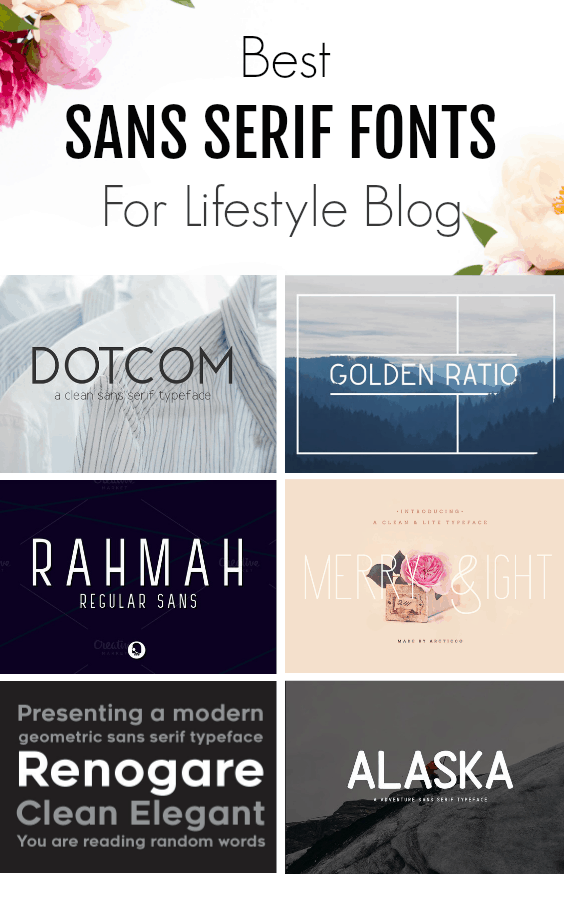
You can purchase it here:
Dotcom // Golden Ratio // Rahmah // Merry Light // Renogare // Alaska

You can purchase it here:
Soullove // Victoria // Coffee // Morning Dew // Girl Boss // Winchester
Other places where to download fonts
#1 Free Design Resources
This is where you can get everything from fonts to stock photos and many more. You can download everything for free and no attribute needed at Free Design Resources. You can also sign up to their mailing list to get notified when new stuff is out.
#2 Fontbundles.Net
Fontbundles is a place where you can get a good price for a certain amount of fonts. They usually have sales also which is $1 per fonts. Fontbundles.net is my go-to place if I want to find fonts for my printable.
#3 Creative Fabrica
If you know websites such as 1001fonts.com and dafont.com then this could be a place where you can buy the paid version for the FREE fonts that those 2 websites offer.
Some free fonts may not give you permission for commercial use but you can use it for commercial when you buy it from Creative Fabrica.
Creative Fabrica also offering craft design and free resources that you can download after signing up for them. You can also choose a membership plan for $19 per month to get the unlimited download access for fonts on the website.
Now, I’m not going to include Creative Market here. Because for me, Creative Market is much better for other design resources such as stock photos, themes, logos.
And that’s a wrap!
Hope you get something from this post on how to do font pairings for your blog. You can check out my other blogging series here:
See ya on the other side!
-Monica


Once you buy them, how do you get them onto your blog? I use Weebly for my website – wondering if there is some way I could do it. These are beautiful!